

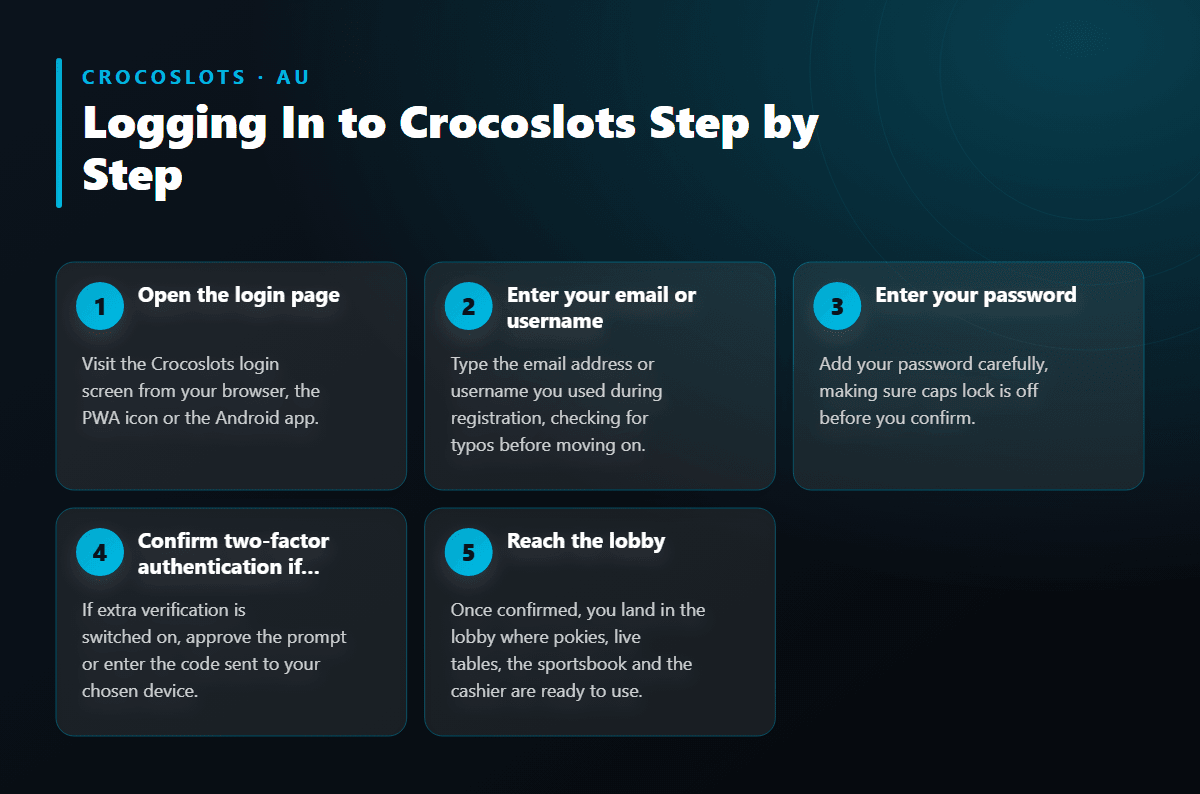
1
Open the login page
Visit the Crocoslots login screen from your browser, the PWA icon or the Android app.
Logging in to Crocoslots takes just a few seconds once you have your email or username and password ready, whether you are sitting at a desktop or using a phone browser. This page walks Australian players through the login steps on every device, how to recover a lost password, and what to check if access suddenly stops working. It also covers the account security options and the features waiting for you the moment you reach the lobby.
The fastest way to reach your account on a laptop or desktop is through the browser-based login screen. There is nothing to install, so the process stays the same whether you use Chrome, Firefox, Edge or another modern browser. Open the login area, enter the email address or username you registered with, add your password and confirm.
A "remember me" option is available for personal computers, which keeps the email field filled in for your next session without storing the password itself. This is handy for players who check pokies or the sportsbook from the same machine every day, although it is best left switched off on shared or public computers. If you are new to the casino rather than returning, creating a new account only takes a couple of minutes and gives you the same login details to use afterwards.
Desktop login also tends to load the full lobby layout faster, since larger screens show more games, filters and cashier options at once. Players who move between pokies, live dealer tables and sports markets in the same session often prefer this view for that reason.
Mobile access is built around a progressive web app rather than a download from an app store, which means the login screen looks and behaves the same whether you open it in a mobile browser or from an icon saved to your home screen. On Android devices, the casino also offers an APK file as an alternative route into the same account, giving players a choice between the browser version and an installed app icon.
There is no dedicated native app for iPhone or iPad, so iOS players log in through the mobile browser or by saving the PWA to their home screen, which still behaves like a standalone app once added. The login fields are identical across devices: your email or username, your password and, if enabled, a second confirmation step. More detail on installing and using the mobile version is available on the app page.
Mobile login is particularly useful for live betting and quick pokies sessions, since the layout is built to load fast on smaller screens without losing access to the cashier or promotions tab.
| Login Method | Device | What You Need | Best For |
|---|---|---|---|
| Browser Login | Desktop or Laptop | Email or username and password | Full-screen play and easy cashier access |
| Mobile Browser | Phone or Tablet | Updated mobile browser | Quick sessions without installing anything |
| Progressive Web App | Android or iOS | PWA added to home screen | App-like access without an app store |
| Android APK | Android Phone | APK file from the Crocoslots site | Full lobby and sportsbook in one app icon |
Follow these steps to reach your account from any device.
If a password slips your mind, the login screen includes a recovery link that sends a reset email to the address on file. Opening that email and following the prompt lets you set a new password immediately, after which you can log in as usual with the updated details.
Players who no longer have access to the original email address, or who suspect their account details were changed without their input, should contact support directly rather than repeatedly guessing a password. Support can confirm identity through the usual verification documents and help restore safe access to the account.
It is worth double-checking for simple issues before requesting a reset, such as an accidental space typed into the email field, caps lock left on, or a saved password in the browser that no longer matches a recently updated one.
Most login issues fall into a small number of categories, and each has a straightforward fix:
Working through this list resolves the large majority of login difficulties without needing to contact support at all.
A secure login starts with a strong, unique password that is not reused on other sites. Combining letters, numbers and symbols makes an account noticeably harder to guess or breach, and changing the password periodically adds another layer of protection.
Two-factor authentication is available for players who want an extra step beyond the password alone, usually a code sent to a connected device or email. Turning this on means that even if someone learns your password, they still cannot complete the login without the second confirmation.
On shared or public devices, always log out fully after a session rather than relying on the browser to close automatically. Avoid saving your password on any computer you do not control, and keep an eye on your account activity so you notice quickly if anything looks unfamiliar.
Once inside the account, the lobby brings together pokies, live dealer tables and sportsbook markets in one place, so there is no need to switch platforms between a casino session and a sports bet. Popular titles such as Gates of Olympus sit alongside crash games like Aviator, while the live section runs Evolution Gaming tables including roulette, blackjack and baccarat.
The cashier is reachable from the same account, letting you deposit through options such as Visa, Mastercard, Neosurf, Bitcoin, bank transfer or POLi, and later request a withdrawal using the same or a different supported method. Any active promotions, including the welcome package, also appear in the account's bonus area once you are logged in, ready to be claimed or tracked.
Support sits a click away as well, available around the clock for account questions, payment queries or anything related to login access.